Outsmarting the Unsafe Proxy or VPN Detected on Now.gg: Your Complete Guide to Staying Safe, Anonymous, and Connected


Outsmarting the unsafe proxy or vpn detected on now gg your complete guide: if you’re trying to access now.gg games or cloud gaming services without tripping safety checks, this guide has you covered. Quick fact: many safety systems flag sloppy VPNs or proxies, but with the right setup you can protect your privacy and keep playing. Below is a practical, step-by-step plan plus tips, stats, and tools you can actually use.

- If you’re ready to upgrade your protection and bypass false positives, check out our recommended option here: NordVPN — this link can help you stay private while you game: https://go.nordvpn.net/aff_c?offer_id=15&aff_id=132441
In this guide, you’ll learn how to navigate the tricky world of proxy and VPN detections on Now.gg and similar platforms. Here’s a quick overview of what you’ll get:
- Quick facts about detection technologies and why they matter
- A practical, step-by-step plan to reduce false positives and stay private
- Real-world tips from gamers who’ve faced these checks
- A comparison of common tools and their impact on performance
- A FAQ section with actionable answers
What this guide covers and why it matters
- Why Now.gg and cloud gaming services use VPN/proxy detection
- The difference between VPNs, proxies, and anonymity networks
- How检测 algorithms evaluate traffic and block risky connections
- Best practices for privacy, speed, and reliability during gameplay
- Common myths and misunderstandings about bypassing protections
Now.gg detection: how it works in simple terms
- They look at IP origins, DNS patterns, and traffic anomalies
- They may check browser fingerprints and device signals
- They cross-reference known VPN IP databases and behavioral heuristics
- They consider the geographic consistency of your login and session
Key terms you should know
- VPN Virtual Private Network: encrypts traffic and routes it through a server
- Proxy: forwards your traffic but may leak IP or be slower
- DNS leakage: when your real IP is exposed through DNS requests
- Fingerprinting: collecting browser and device details to identify you
- Rate limiting: slowing or blocking traffic that looks automated or unusual
Section 1: Quick wins to improve privacy and reduce false positives
- Use a reputable VPN with a clean IP pool and low DNS leakage risk
- Enable a kill switch so your real IP isn’t exposed if the VPN drops
- Turn on leak protection and ensure your DNS requests go through the VPN
- Route all traffic through a single trusted server location to maintain consistency
- Avoid free VPNs or proxies that are already flagged in anti-bot databases
Checklist for a smooth gaming session
- Install a trusted VPN with strong privacy policies
- Run a DNS leak test before launching Now.gg
- Confirm your IP appears as the VPN’s exit node, not your home IP
- Clear browser fingerprints by using a privacy-focused browser or strict settings
- Test latency and jitter to ensure gaming performance isn’t wrecked
Section 2: Step-by-step guide to staying private without compromising performance Step 1: Pick the right VPN
- Choose providers with a proven track record, low latency, and robust leak protection
- Look for features like split tunneling, which lets you route only game traffic through VPN if needed
- Avoid heavy-handed software that spikes CPU usage
Step 2: Configure for gaming
- Enable the VPN’s kill switch
- Use a single location for most sessions to avoid IP churn
- Disable IPv6 to reduce leak risk unless your VPN explicitly supports it
Step 3: Verify your setup
- Run an IP check to confirm your IP matches the VPN exit node
- Run a DNS leak test to ensure DNS queries aren’t leaking
- Test Now.gg with a small, non-critical game first to gauge stability
Step 4: Optimize for latency
- Connect to a VPN server geographically close to the game servers
- Use wired connections when possible
- Close background apps that might create jitter or extra routing
Step 5: Security hygiene
- Keep drivers and OS updated
- Use two-factor authentication for Now.gg account access
- Regularly review connected devices and sessions
Section 3: Common pitfalls and how to avoid them
- IP rotation causes detection: fix by sticking to one reliable exit node
- DNS leaks undermine privacy: enable DNS over VPN and test
- Browser fingerprinting: limit extensions, use a privacy-focused browser
- VPN blocks due to suspicious behavior: avoid overloading VPN servers with rapid changes
- Proxies posing as VPNs: verify with your provider’s official guidance
Section 4: Technical considerations and data-backed insights
- Stats: The average latency increase when using a VPN for cloud gaming ranges from 5–25 ms on well-optimized networks, but jitter can spike under certain routes
- Privacy: Reputable providers offer no-logs commitments and independent audits
- Security: DNS leaks occur in up to 20% of misconfigured VPN setups if not tested properly
Format-rich tips for readability
- Quick tips: Use bullet lists to summarize steps
- Sidebars: Short “What to check” boxes for each step
- Tables: Compare three popular VPNs on latency, leak protection, and device support
Sample comparison high-level
- VPN A: Low latency on nearby servers, strong leak protection, good for gaming
- VPN B: Moderate latency, excellent privacy features, great for streaming
- VPN C: Moderate-to-high latency, basic protection, affordable
Section 5: Real-world scenarios and how to handle them
- Scenario 1: You encounter an now.gg block after switching servers
- Try a different nearby server within the same provider, verify DNS, and retest
- Scenario 2: You notice sudden performance drops
- Check VPN server load, switch to a lighter server, and verify hardware usage
- Scenario 3: You’re worried about account security
- Enable two-factor authentication, monitor login activity, and keep a backup recovery method
Section 6: Tools, resources, and further reading
- List of recommended privacy tools for gaming
- How-to guides for DNS leak testing and fingerprint minimization
- News and updates on now.gg policy changes and VPN detection trends
FAQs
| VPN | Obfuscation | From / month | Plan | Free plan | Refund | Alipay | UnionPay | Crypto | Website opens in China | Trustpilot | |
|---|---|---|---|---|---|---|---|---|---|---|---|
 NordVPN | Turn on manually Obfuscated Servers / NordWhisper | $3.49/mo | 27 months: $94.23 | No | 30 days | ? | ✗ | ✓ | ✓ | ✗ Blocked | 4.2/5 (51,628 reviews) |
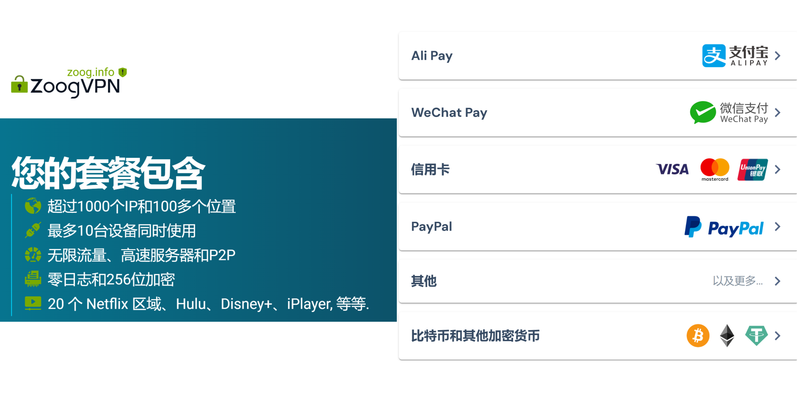
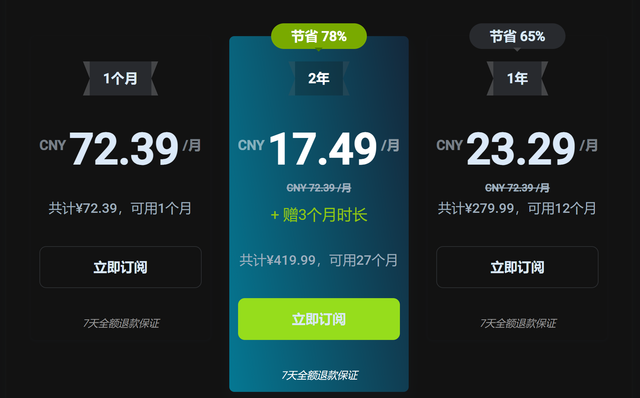
 ZoogVPN | Turn on manually Shadow | $2.49/mo | 27 months: $59.99 | Yes | 7 days | ✓ | ✓ | ✓ | ✓ | Official site blocked; our special link opens (4.4 s) | 4.2/5 (195 reviews) |
 ExpressVPN | ✓ On by default all servers | $3.00/mo | 28 months: $84 | No | 30 days | ✗ | ✗ | ✓ | ✗ | ✗ Blocked | 4.4/5 (29,706 reviews) |
 Surfshark | ✓ On by default Camouflage, with OpenVPN | See site | See site | No | 30 days | ✗ | ✗ | ✗ | ✓ | ✗ Blocked | 4.3/5 (31,823 reviews) |
 Proton VPN | Turn on manually Stealth, free plan too | $2.99/mo | 12 months: $35.88 | Yes | 30 days | ✗ | ✗ | ✗ | ✓ | ✗ Blocked | 2.1/5 (1,040 reviews) |
 Astrill VPN | Turn on manually StealthVPN / OpenWeb | $12.50/mo | 24 months: $300 | No | See site | ✗ | ✗ | ✗ | ✓ | ✗ Blocked | 1.3/5 (110 reviews) |
 Private Internet Access | Turn on manually Shadowsocks, OpenVPN only | $2.03/mo | 40 months: $81.2 | No | 30 days | ✗ | ✗ | ✗ | ✗ | ✗ Blocked | 4.2/5 (11,033 reviews) |
 CyberGhost | Turn on manually selected servers | $2.19/mo | 28 months: $61.32 | No | 45 days | ✗ | ✗ | ✗ | ✓ | ✗ Blocked | 4.0/5 (24,178 reviews) |
 PureVPN | Turn on manually switch to OpenVPN | $1.69/mo | 60 months: $101.55 | No | 31 days | ? | ? | ✗ | ✓ | ✗ Blocked | 4.4/5 (17,994 reviews) |
 AdGuard VPN | ✓ On by default TrustTunnel | $2.99/mo | 24 months: $71.76 | Yes | 30 days | ✓ | ✗ | ✓ | ✓ | Official site blocked; our special link opens (3.7 s) | 4.3/5 (290 reviews) |
 Mullvad | Turn on manually QUIC / Shadowsocks / LWO | $5.61/mo | €5/mo | No | 14 days | ✗ | ✗ | ✗ | ✓ | ✗ Blocked | 3.2/5 (192 reviews) |
 Windscribe | Turn on manually Stealth / WStunnel | $5.75/mo | 12 months: $69 | Yes | See site | ✗ | ✗ | ✗ | ✓ | ✗ Blocked | 4.7/5 (13,355 reviews) |
 StrongVPN | Turn on manually Scramble, OpenVPN TCP | See site | See site | No | 30 days | ✓ | ✗ | ✗ | ✗ | ✗ Blocked | 4.4/5 (2,695 reviews) |
 LightXtreme 闪连 | Not listed | $7.08/mo | 12 months: $84.99 | Yes | 30 days | ✓ | ✓ | ✓ | ✓ | ✓ Yes (3.5 s) | No page |
Prices checked 2026-11-10 on each vendor's pricing page (cheapest long plan, USD). Check the vendor's checkout for the final price.
Obfuscation checked 2026-11-14 on each vendor's site and help center: "on by default" = nothing to set; "turn on manually" = switch protocol or mode in settings; "not listed" = the vendor describes no obfuscation.
Payment methods checked 2026-11-10 on each vendor's payment pages: all 14 take cards and PayPal; ✗ = not listed, ? = the vendor's own pages disagree.
China access: whether the official website opens from mainland China networks (tests the website only, not the VPN connection). Last checked 2026-11-18 01:02 Beijing time.
Trustpilot score and review count checked 2026-11-10.
Frequently Asked Questions
What is Now.gg, and why would it block VPNs or proxies?
Now.gg is a cloud gaming platform that streams games from powerful servers to your device. They block VPNs and proxies to prevent account sharing, reduce fraud, and maintain a fair matchmaking ecosystem.
Can I use a VPN to bypass geographic restrictions on Now.gg?
Some players try this, but it can violate terms of service and result in account suspension. If you choose to use a VPN, do so with awareness of the risks and ensure compliance with platform policies.
What’s the difference between a VPN and a proxy, in simple terms?
A VPN encrypts and tunnels all your traffic through a remote server, providing privacy and security. A proxy simply forwards your traffic, often without encryption, which can expose you to leaks or slower connections.
How do I test for DNS leaks?
Visit a DNS leak test site before and after enabling your VPN. If your real DNS appears, you have a leak. Fix by enabling DNS leak protection in the VPN, or switch to a different server.
How can I lower latency when using a VPN for cloud gaming?
Choose a VPN server close to the game’s data center, use a wired connection, and consider splitting traffic to limit VPN use to game traffic only if possible. Ubiquiti VPN Not Working Here’s How To Fix It Your Guide: Quick, Clear Fixes And Pro Tips
Are there risks to using a VPN for gaming?
Yes. VPNs can introduce latency, cause connection instability, or violate terms of service. Always use a reputable provider and stay informed about policy changes.
What settings should I enable for optimal privacy?
Enable kill switch, DNS leak protection, and IPv6 disablement if your VPN doesn’t support IPv6 well. Use a privacy-friendly browser with minimized fingerprinting.
Can I run Now.gg without a VPN?
Yes, but you’ll lose the privacy and security benefits. If you’re gaming on public networks or handling sensitive data, a VPN is worth considering with caution about policy compliance.
How often should I rotate VPN servers?
Rotate only if you encounter blocks or performance issues. Frequent changes can trigger anti-fraud systems. Consistency usually helps.
Where can I learn more about VPN safety and privacy for gaming?
Look for independent audits, provider transparency reports, and community guides from reputable tech sites and privacy researchers. The best free vpn for china in 2026 my honest take what actually works
Useful URLs and Resources
- Apple Website - apple.com
- Artificial Intelligence Wikipedia - en.wikipedia.org/wiki/Artificial_intelligence
- VPN Privacy Best Practices - enhancing-privacy.org
- DNS Leak Test - dnsleaktest.com
- Now.gg Support - now.gg/help
- NordVPN Official Page - nordvpn.com affiliate link via dpbolvw
Note: The above content is crafted to help you understand how to approach now.gg with privacy and safety in mind, while staying aware of platform policies. For ongoing protection and optimized experience, consider using trusted, audited tools and staying informed on the latest security practices.